> ## Documentation Index
> Fetch the complete documentation index at: https://support.hexus.ai/llms.txt
> Use this file to discover all available pages before exploring further.
# Create a Hexus Flow (Without Chrome Extension)
> Create a Hexus flow without using the Chrome Extension by uploading videos, images, or importing videos. Perfect for repurposing existing content and getting started quickly
You can create a Hexus Flow from scratch **without using the Chrome Extension**. This method allows you to upload your own videos and images or import existing Loom videos to build interactive product demos. It’s perfect for repurposing content and getting started with Hexus without the Chrome extension. If you're sitting on a goldmine of product videos or demos, you can now repurpose them into interactive walkthroughs in minutes using Hexus. Here's a quick guide on the **two ways to convert videos** with Hexus.
**Hexus Tip:** Use this option to quickly turn existing marketing, sales, or support videos into engaging, interactive experiences for your users.
***
### **Getting started without the Chrome Extension**
1. Go to [https://app.usehexus.com/video-to-flow](https://app.usehexus.com/video-to-flow)
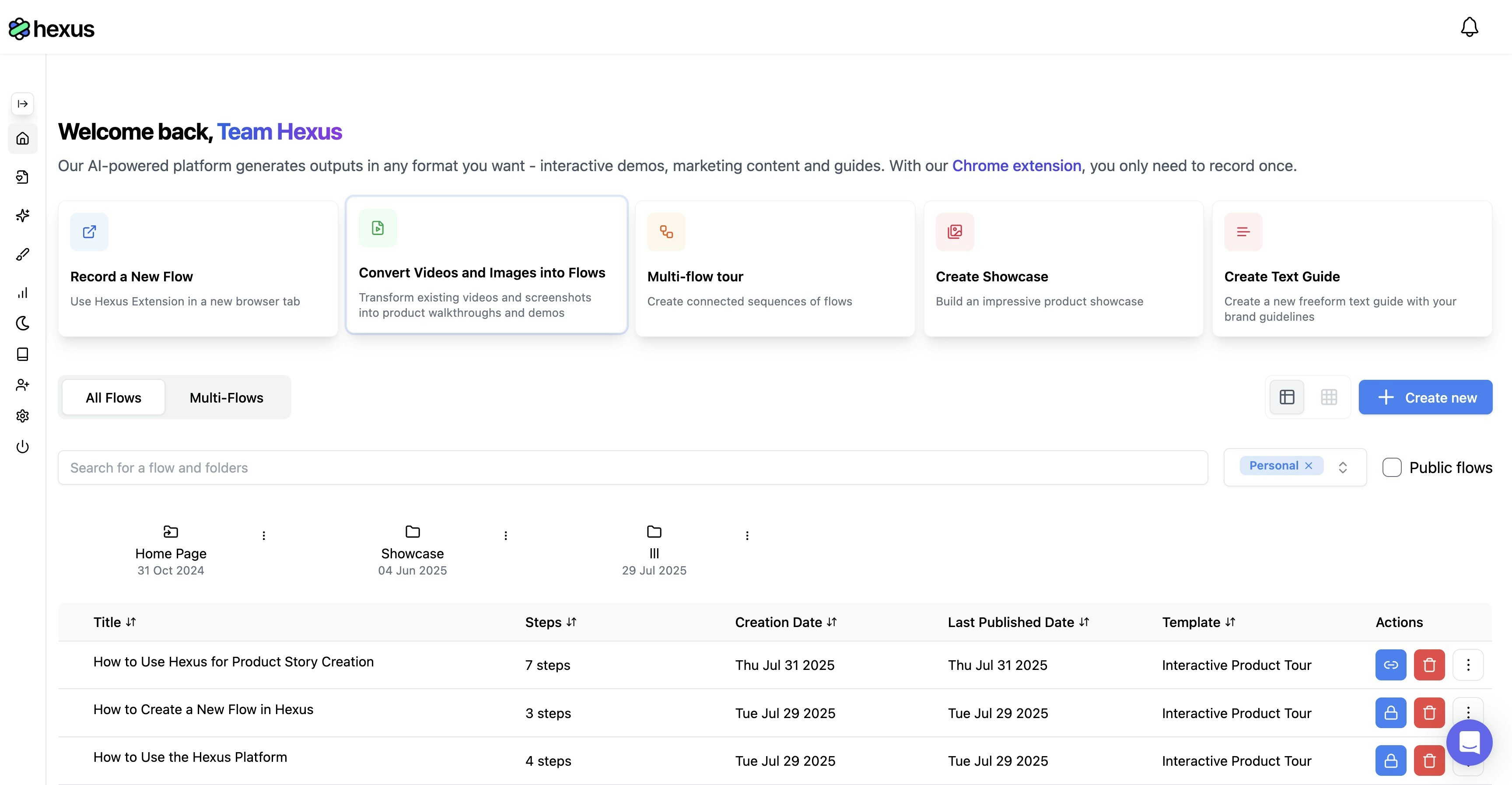
2. On your dashboard, click on **“Convert Videos and Images into Flows”**
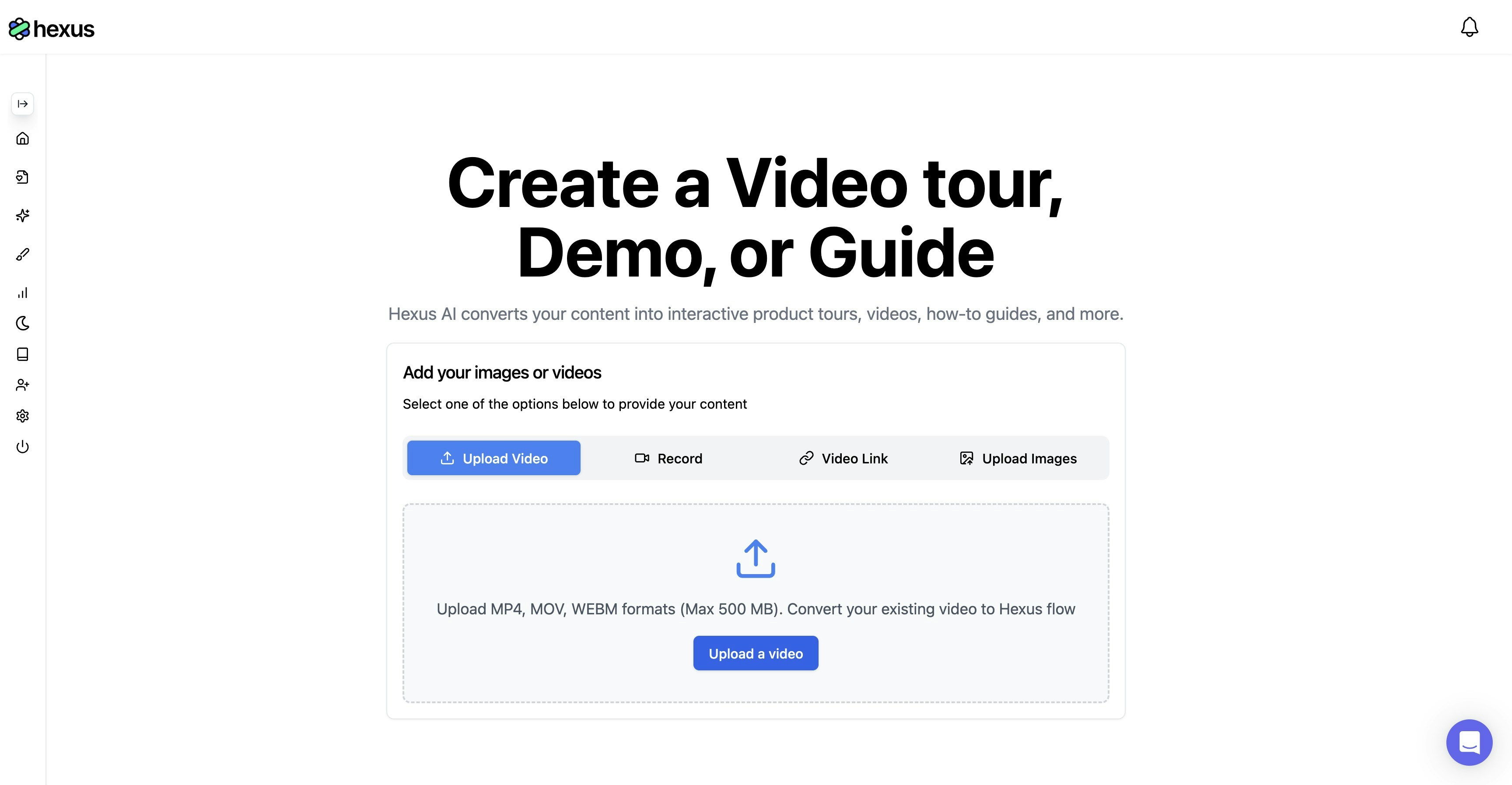
 3. Choose your content source:
* **Upload a video** (MP4 format recommended)
* **Upload images** (JPG, PNG, or GIF)
* **Import from Loom** by pasting the Loom video URL
* **Record your screen** if you can't use the chrome extension or want to record or want a complete video
3. Choose your content source:
* **Upload a video** (MP4 format recommended)
* **Upload images** (JPG, PNG, or GIF)
* **Import from Loom** by pasting the Loom video URL
* **Record your screen** if you can't use the chrome extension or want to record or want a complete video
 4. After uploading your desired files, add a script for your AI voiceover, AI Avatar or record your own video and audio. Note if you cant to convert your video to a Hexus Flow (Interactive demo) use the option.
.png?fit=max&auto=format&n=WNzO3pj1J3sBet3O&q=85&s=bf7399577232dc2b7a132147485a761b) 5\. Click on Done to finish building your flow!
Here's your **guided tour** on how to create a video from scratch on Hexus.
***
### **Why use this method?**
* **No Chrome Extension required**: Great for users on restricted browsers or corporate devices.
* **Repurpose existing content**: Turn marketing videos, support walkthroughs, or product clips into reusable interactive demos.
***
### **Best practices**
* Keep your flows short and focused, ideally under 2 minutes for higher engagement.
* Use a **clear video resolution (720p or higher)** to ensure text and UI elements are visible.
* Combine multiple images or clips into one seamless flow for a guided experience.
5\. Click on Done to finish building your flow!
Here's your **guided tour** on how to create a video from scratch on Hexus.
***
### **Why use this method?**
* **No Chrome Extension required**: Great for users on restricted browsers or corporate devices.
* **Repurpose existing content**: Turn marketing videos, support walkthroughs, or product clips into reusable interactive demos.
***
### **Best practices**
* Keep your flows short and focused, ideally under 2 minutes for higher engagement.
* Use a **clear video resolution (720p or higher)** to ensure text and UI elements are visible.
* Combine multiple images or clips into one seamless flow for a guided experience.